登录
登录

Why Is My PC Power Button Blinking? What the Light Means

Short answer: On many NZXT cases, a flickering power button is normal. The button holds two lights: a power light that stays on while the PC runs and a drive activity light that flickers whenever your SSD or hard drive reads or writes. To stop the flicker, turn off the HDD LED in BIOS or disconnect its wire.
If your power button flickers while you game or browse and settles down when the PC is idle, nothing is wrong. Here's what the light is telling you and how to turn the flicker off if it bugs you.
Why the power button flickers
The light ring around the power button on many NZXT cases is two LEDs, not one:
- The power LED stays on for as long as the PC is on.
- The HDD activity LED lights up every time a drive in the PC reads or writes data. Despite the name, it covers SSDs too.
Your drives work in short bursts, so the activity LED flickers on and off over the steady power light. The busier the PC, the more it flickers. Loading a game or installing an update can keep it going for a while.
What the light is telling you
| What you see | What it means |
|---|---|
| Steady light | The PC is on and the drives are quiet |
| Flickering while you use the PC | A drive is reading or writing. Normal |
| Flickering while the screen is frozen | The PC is still working on something. Give it a minute before you force a shutdown |
| A slow, even pulse while the PC seems off | On many motherboards, this means the PC is asleep. Press a key or the power button to wake it |
| No light when you press the button | The PC isn't powering on. See PC won't turn on |
The activity light is handy when a PC stops responding. If it's still flickering, Windows is busy rather than frozen. Holding the power button to force a shutdown mid-write can lose or corrupt data, so wait for the flicker to stop if you can.
How to stop the flickering
You have two options. Try the first before you open the case.
Option 1: Turn off the HDD LED in BIOS
Some motherboards have a BIOS setting to switch off the HDD activity LED. Its name and location vary by board, so check your motherboard manual or search its BIOS settings for "LED". If your board doesn't have one, move on to option 2.
Option 2: Disconnect the HDD LED wire
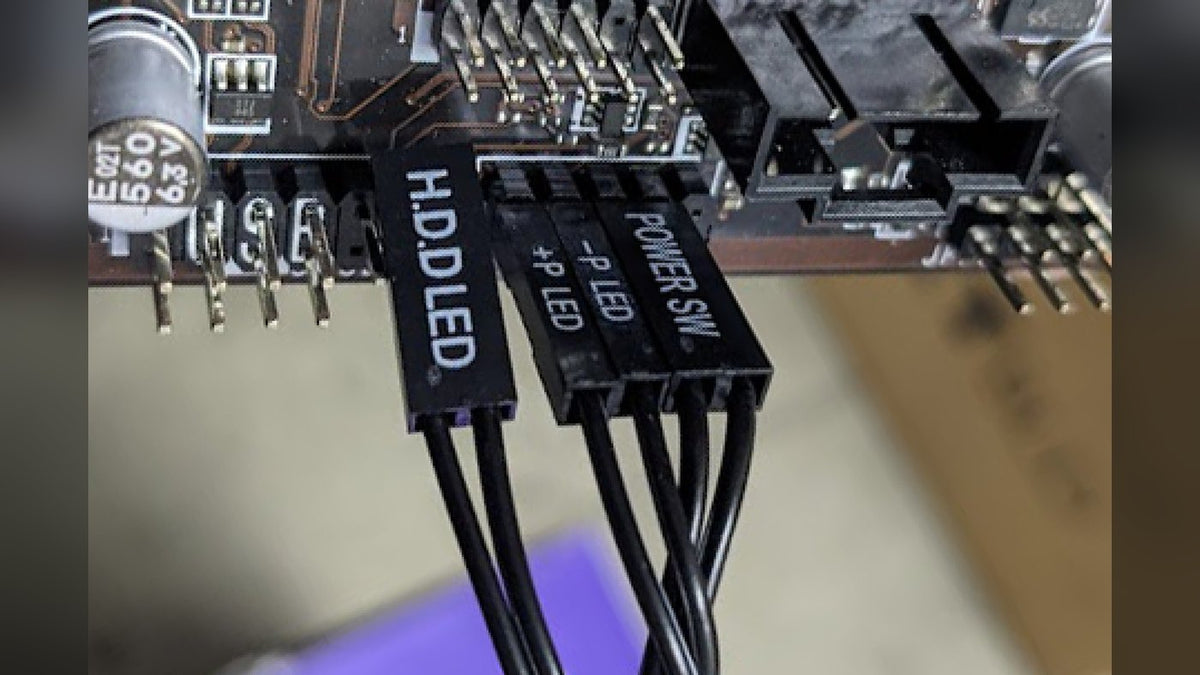
The power button's lights connect to the front panel header on your motherboard, usually labeled F_PANEL or JFP1. Leaving the HDD LED pins unconnected switches that light off for good.
How you do that depends on your case:
- Older NZXT cases use separate small plugs for each function. Shut down, switch off the PSU and unplug the HDD LED plug (sometimes two single wires, + and -) from the header. Leave everything else connected.
- Newer NZXT cases use a single combined F_PANEL plug, so there's no separate HDD LED plug to pull. You need an F_PANEL extension or breakout cable, which splits the combined plug back into individual wires.
With a breakout cable, plug the case's F_PANEL connector into it, then connect only these wires to the motherboard header:
- Power switch (Power SW)
- Power LED positive (+P LED)
- Power LED negative (-P LED)
- Reset switch (Reset SW), on older cases that have a reset button
Leave the HDD LED wires disconnected. Your motherboard manual shows which pin is which on its header.
Frequently asked questions
Is a flickering power button a sign something is wrong?
No. It's your drives working. It would only be worth a look if the flicker never stops even when the PC is doing nothing, which can mean a background task like an update or a scan is running.
Where do I get an F_PANEL breakout cable?
NZXT no longer includes one with newer cases, since most current motherboards use the combined F_PANEL layout. Search online retailers for "F_PANEL breakout cable" or "motherboard extension wire" to find one.
Will the power light still work if I disconnect the HDD LED?
Yes. The power LED has its own pins (+P LED and -P LED), so it stays on while the PC runs. Only the flicker goes.
Will disconnecting the HDD LED affect performance?
No. It's only a light. Your drives work exactly the same with or without it.
My PC won't turn on and the power button doesn't light up. What now?
That's a power problem, not an LED one. Start with our guide to what to do when your PC won't turn on. If everything checks out, the PSU paperclip test tells you whether the power supply can switch on at all.
Need a hand?
If your NZXT case's power button won't light at all while the PC runs, the case's front panel cable may be loose or faulty. Contact NZXT Support with your case model and proof of purchase.